
How to Charge a Vibrator: Cables, Docks & Lights Explained
Learn how to charge a vibrator with USB cables, magnetic docks, and indicator lights. Simple steps for rechargeable toy maintenance.
 Zoe Clarke
Introduction
How do you charge a vibrator? Your toy died mid-session, and now you're staring at a USB cable, a magnetic dock, or a blinking light you don't understand. Most first-time buyers assume charging a vibrator is intuitive — plug it in, wait, done. But rechargeable toys use different systems, and the manual that came in the box is either missing or written like a technical spec sheet.
Here's the thing: charging a vibrator isn't complicated, but the industry does a terrible job explaining the basics. You've got magnetic contacts that snap into place, USB cables that look identical to your phone charger, and indicator lights that blink in patterns nobody documents. If you've ever wondered whether that blinking light means "charging" or "about to explode," you're not alone.
This guide walks through how do you charge a vibrator — the cables, the docks, the lights, and the mistakes that wreck batteries. If you're also exploring hands-free options, check out vibrating panties for wearable rechargeable designs. No fluff, no assumptions that you already know what a charging contact is. Just the steps that get your toy from dead to ready.
Problem Statement
Most first-time vibrator buyers don't realize charging is a thing until the toy dies mid-use. You pull it out of the box, turn it on, maybe use it once or twice — then nothing. No buzz, no light, no idea where the charging port even is.
The problem isn't that charging is hard. It's that most toys don't ship with obvious instructions, the charging contacts are weirdly hidden, and the indicator lights speak a language nobody taught you. You're left guessing: Is it charging? Is it broken? Do I need to hold the button down? And if you bought a magnetic-dock model, good luck figuring out which end snaps to which.
Here's what most sites miss: the charging experience varies wildly by price tier. Budget toys under $30 often use micro-USB ports tucked under a silicone flap that's nearly impossible to pry open without fingernails. Mid-tier and premium models ($50+) typically use magnetic charging contacts that snap into place — but those contacts corrode if you don't clean them, and the magnets lose grip if the toy or cable gets dusty.
The other issue nobody warns you about: low-power alerts that don't actually alert. Some toys blink when the battery is low. Others just… stop. If you're used to your phone giving you a 20% warning, a vibrator that goes from full power to dead in the span of one session feels like a betrayal.
Why does this matter? Because a dead toy is a useless toy, and most people don't keep a charging cable within arm's reach of the bed. If you don't build a charging routine early, you'll spend half your solo time troubleshooting instead of using the thing.
How Do You Charge a Vibrator? Step-by-Step
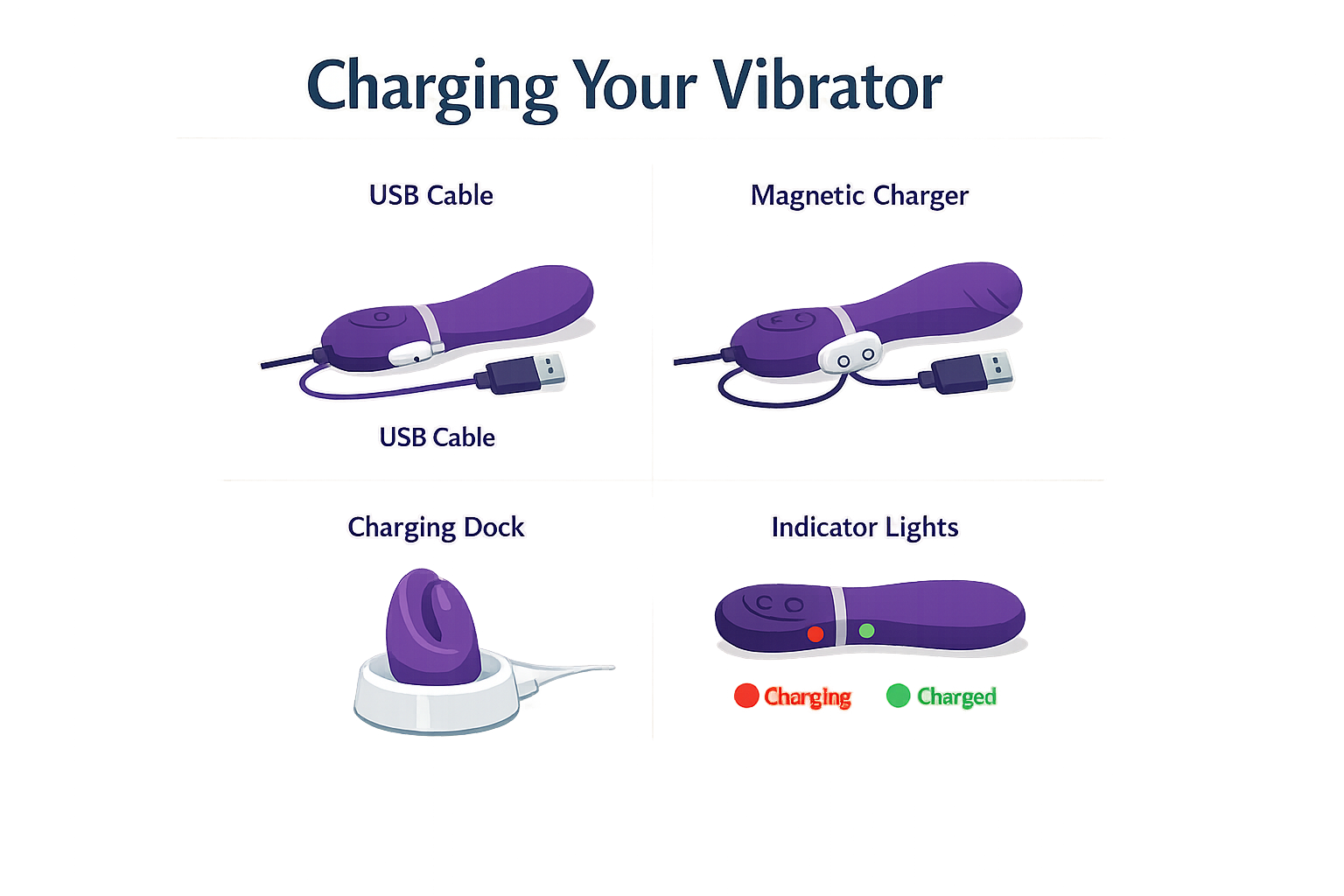
Most vibrators charge one of three ways: USB cable, magnetic dock, or charging base. Here's how to figure out which one you have and what to do with it.
What Type of Charger Does Your Vibrator Use?
Check the box or manual. If you don't have either, look at the toy itself — charging contacts are usually small metal dots near the base or on the handle. USB-only models have a port (sometimes hidden under a flap). Magnetic chargers snap into place when you get close to the contacts.
Step 1
Locate the charging contacts
Most rechargeable vibrators have two small metal circles somewhere on the body — usually on the handle, near the base, or on the external portion of wearable toys. If you see a small rubber flap, lift it to check for a USB port underneath.
Step 2
Connect the charger
For magnetic chargers: hold the magnetic end near the metal contacts and let it snap into place. For USB cables: plug the cable into the port (you may need to remove a protective flap first). For charging bases: place the toy into the cradle so the contacts line up.
Plug Into Power
Once the charger is attached to the toy, plug the USB end into any USB power source — a laptop, phone adapter, or wall outlet with a USB plug. The toy doesn't care where the power comes from as long as it's a standard USB port.
Watch the Indicator Light
Most vibrators have a small LED that blinks while charging and stays solid when fully charged. If the light doesn't turn on, twist the magnetic charger slightly to improve contact, or check that the USB cable is seated properly in the port.
Charging time is usually 90 minutes for a full charge, which gives you around 2 hours of use. If the light blinks during use, that's the low-power alert — time to charge soon.
Disconnect When Fully Charged
When the light stops blinking and stays solid, the battery is full. Unplug the USB cable first, then remove the magnetic charger or close the USB port flap. Store the toy in a dry place — some models come with a storage pouch or the charging base doubles as a case.
Troubleshooting: When It Won't Charge
If the light doesn't come on, try these fixes:
- Clean the contacts — use rubbing alcohol on a cotton swab to remove any residue from lube or body fluids.
- Check the cable — swap in a different USB cable to rule out a bad wire.
- Twist the magnetic charger — sometimes the contacts need better alignment.
- Let it sit — if the battery is completely dead, leave it plugged in for 10–15 minutes before the light appears.
If none of that works, contact the manufacturer. Most rechargeable toys have a 1-year warranty that covers charging issues.
For more guidance on hands-free options, see our guide to butterfly vibrators.
Tips and Tricks for Charging Your Vibrator
Most first-time buyers treat charging like an afterthought — plug it in once, forget about it, then wonder why the battery dies mid-session six months later. Here's what actually keeps a rechargeable toy running.
Charge it regularly, even when you're not using it
Lithium polymer batteries (the kind in most rechargeable vibrators) don't like sitting empty. If you let a toy sit uncharged for months, the battery degrades faster. Charge it every few weeks even if it's just sitting in a drawer — think of it like keeping your phone topped up.
Clean the charging contacts before you plug in
Dust, lube residue, and body oils build up on those little metal charging pins. If your toy won't charge or the connection feels loose, clean both the toy's contacts and the charger's contacts with rubbing alcohol on a cotton swab. Let them dry completely before you connect them.
Magnetic chargers snap into place when the contacts are clean. If yours keeps falling off, it's probably dirty — not broken.
Watch the indicator light (it's telling you something)
Most vibrators have an LED that blinks while charging and goes solid when full. If the light doesn't turn on at all, check your USB power source first — not all phone chargers or laptop ports push enough power. Try a different USB port or a wall adapter.
The low-power alert (usually a blinking light during use) means you've got maybe 10–15 minutes left. Don't ignore it — running a lithium battery completely dead shortens its lifespan.
Store it smart
If your toy came with a charging base or a storage pouch, use it. Charging bases double as dust covers, and pouches keep the charging port clean. Don't toss a rechargeable toy loose in a drawer where the charging contacts can get scratched or corroded.
For wearable or hands-free options like clit stimulators, proper storage matters even more — those magnetic contacts are smaller and easier to damage.
Don't leave it plugged in for days
Once the light goes solid, unplug it. Leaving a toy on the charger for 48+ hours won't ruin it, but it's not doing the battery any favors either. Most vibrators charge fully in 90 minutes to 2 hours — set a timer if you're the type who forgets.
Conclusion
Charging your vibrator isn't complicated — it's just one of those things nobody explains until you're standing there with a dead toy and a cable that won't snap into place. Most rechargeable vibrators use USB cables or magnetic docks, both of which work fine as long as you keep the charging contacts clean and don't yank the cable out mid-charge. The blinking light means it's working; the solid light means it's done.
If you're still figuring out what works for your body, check out our guide to tongue vibrators — charging is one thing, but finding the right toy in the first place is the part that actually matters. Most toys charge in 90 minutes and run for about two hours, which is more than enough for most sessions. Store it on the dock or in the pouch it came with, and you won't have to hunt for the cable every time.
The real trick is just treating it like your phone: charge it when it's low, don't leave it plugged in for days, and clean the contacts if it stops connecting. That's it. The rest is just using the thing.
FAQ
How long does it take to charge a vibrator?Most rechargeable vibrators take 90 minutes to 2 hours for a full charge, which provides approximately 2 hours of use.
Can you use a vibrator while it's charging?No. Most rechargeable vibrators disable operation while plugged in for safety reasons. Always let the toy charge fully before use.
Why won't my vibrator charge?Clean the charging contacts with rubbing alcohol, check that the USB cable is fully seated, and try a different power source. If the battery is completely dead, leave it plugged in for 10–15 minutes before the indicator light appears.
Do you need to drain the battery before charging?No. Rechargeable vibrators use lithium polymer batteries that work best with regular top-ups. You don't need to fully drain them before charging.
How often should you charge a vibrator?Charge your vibrator after each use or whenever the low-power indicator appears. Even if you're not using it, charge it every few weeks to maintain battery health.
Learn how do you charge a vibrator effectively with tips on cables, magnetic docks, and indicator lights.